Progress Bar
When executing longer-running commands, it may be helpful to show progress information, which updates as your command runs:
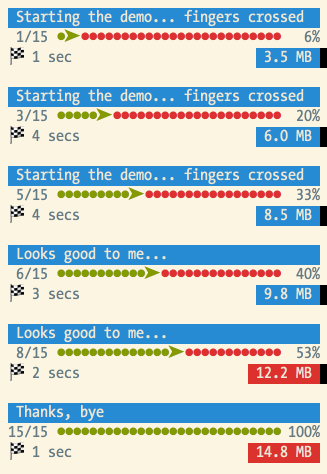
To display progress details, use the
Symfony\Component\Console\Helper\ProgressBar, pass it a total
number of units, and advance the progress as the command executes:
use Symfony\Component\Console\Helper\ProgressBar;

// creates a new progress bar (50 units)
$progressBar = new ProgressBar($output, 50);

// starts and displays the progress bar
$progressBar->start();

$i = 0;
while ($i++ < 50) {
    // ... do some work

    // advances the progress bar 1 unit
    $progressBar->advance();

    // you can also advance the progress bar by more than 1 unit
    // $progressBar->advance(3);
}

// ensures that the progress bar is at 100%
$progressBar->finish();
Tip
You can also regress the progress bar (i.e. step backwards) by calling
$progress->advance() with a negative value. For example, if you call
$progress->advance(-2) then it will regress the progress bar 2 steps.
Instead of advancing the bar by a number of steps (with the :method:`Symfony\\Component\\Console\\Helper\\ProgressBar::advance` method), you can also set the current progress by calling the :method:`Symfony\\Component\\Console\\Helper\\ProgressBar::setProgress` method.
Tip
If your platform doesn’t support ANSI codes, updates to the progress
bar are added as new lines. To prevent the output from being flooded,
use the :method:`Symfony\\Component\\Console\\Helper\\ProgressBar::minSecondsBetweenRedraws`
method to limit the number of redraws and the
:method:`Symfony\\Component\\Console\\Helper\\ProgressBar::setRedrawFrequency` method
to redraw every N iterations. By default, redraw frequency is
100ms or 10% of your max.
If you don’t know the exact number of steps in advance, set it to a reasonable
value and then call the setMaxSteps() method to update it as needed:
// start with a 50 units progressbar
$progressBar = new ProgressBar($output, 50);

// a complex task has just been created: increase the progressbar to 200 units
$progressBar->setMaxSteps(200);
Another solution is to omit the steps argument when creating the
Symfony\Component\Console\Helper\ProgressBar instance:
$progressBar = new ProgressBar($output);
The progress will then be displayed as a throbber:
# no max steps (displays it like a throbber)
    0 [>---------------------------]
    5 [----->----------------------]
    5 [============================]

# max steps defined
 0/3 [>---------------------------]   0%
 1/3 [=========>------------------]  33%
 3/3 [============================] 100%
Whenever your task is finished, don’t forget to call :method:`Symfony\\Component\\Console\\Helper\\ProgressBar::finish` to ensure that the progress bar display is refreshed with a 100% completion.
Note
If you want to output something while the progress bar is running, call :method:`Symfony\\Component\\Console\\Helper\\ProgressBar::clear` first. After you’re done, call :method:`Symfony\\Component\\Console\\Helper\\ProgressBar::display` to show the progress bar again.
If the progress information is stored in an iterable variable (such as an array or a PHP generator) you can use the :method:`Symfony\\Component\\Console\\Helper\\ProgressBar::iterate` method, which starts, advances and finishes the progress bar automatically:
use Symfony\Component\Console\Helper\ProgressBar;

$progressBar = new ProgressBar($output);

// $iterable can be array
$iterable = [1, 2];
foreach ($progressBar->iterate($iterable) as $value) {
    // ... do some work
}

// or a generator
function iterable() { yield 1; yield 2; ... };
foreach ($progressBar->iterate(iterable()) as $value) {
    // ... do some work
}
The previous code will output:
0/2 [>---------------------------]   0%
1/2 [==============>-------------]  50%
2/2 [============================] 100%
Customizing the Progress Bar
Built-in Formats
By default, the information rendered on a progress bar depends on the current
level of verbosity of the OutputInterface instance:
# OutputInterface::VERBOSITY_NORMAL (CLI with no verbosity flag)
 0/3 [>---------------------------]   0%
 1/3 [=========>------------------]  33%
 3/3 [============================] 100%

# OutputInterface::VERBOSITY_VERBOSE (-v)
 0/3 [>---------------------------]   0%  1 sec
 1/3 [=========>------------------]  33%  1 sec
 3/3 [============================] 100%  1 sec

# OutputInterface::VERBOSITY_VERY_VERBOSE (-vv)
 0/3 [>---------------------------]   0%  1 sec/1 sec
 1/3 [=========>------------------]  33%  1 sec/1 sec
 3/3 [============================] 100%  1 sec/1 sec

# OutputInterface::VERBOSITY_DEBUG (-vvv)
 0/3 [>---------------------------]   0%  1 sec/1 sec  1.0 MB
 1/3 [=========>------------------]  33%  1 sec/1 sec  1.0 MB
 3/3 [============================] 100%  1 sec/1 sec  1.0 MB
Note
If you call a command with the quiet flag (-q), the progress bar won’t
be displayed.
Instead of relying on the verbosity mode of the current command, you can also
force a format via setFormat():
$progressBar->setFormat('verbose');
The built-in formats are the following:
normalverbosevery_verbosedebug
If you don’t set the number of steps for your progress bar, use the _nomax
variants:
normal_nomaxverbose_nomaxvery_verbose_nomaxdebug_nomax
Custom Formats
Instead of using the built-in formats, you can also set your own:
$progressBar->setFormat('%bar%');
This sets the format to only display the progress bar itself:
>---------------------------
=========>------------------
============================
A progress bar format is a string that contains specific placeholders (a name
enclosed with the % character); the placeholders are replaced based on the
current progress of the bar. Here is a list of the built-in placeholders:
current: The current step;max: The maximum number of steps (or 0 if no max is defined);bar: The bar itself;percent: The percentage of completion (not available if no max is defined);elapsed: The time elapsed since the start of the progress bar;remaining: The remaining time to complete the task (not available if no max is defined);estimated: The estimated time to complete the task (not available if no max is defined);memory: The current memory usage;message: used to display arbitrary messages in the progress bar (as explained later).
For instance, here is how you could set the format to be the same as the
debug one:
$progressBar->setFormat(' %current%/%max% [%bar%] %percent:3s%% %elapsed:6s%/%estimated:-6s% %memory:6s%');
Notice the :6s part added to some placeholders? That’s how you can tweak
the appearance of the bar (formatting and alignment). The part after the colon
(:) is used to set the sprintf format of the string.
Instead of setting the format for a given instance of a progress bar, you can also define global formats:
ProgressBar::setFormatDefinition('minimal', 'Progress: %percent%%');

$progressBar = new ProgressBar($output, 3);
$progressBar->setFormat('minimal');
This code defines a new minimal format that you can then use for your
progress bars:
Progress: 0%
Progress: 33%
Progress: 100%
Tip
It is almost always better to redefine built-in formats instead of creating new ones as that allows the display to automatically vary based on the verbosity flag of the command.
When defining a new style that contains placeholders that are only available
when the maximum number of steps is known, you should create a _nomax
variant:
ProgressBar::setFormatDefinition('minimal', '%percent%% %remaining%');
ProgressBar::setFormatDefinition('minimal_nomax', '%percent%%');

$progressBar = new ProgressBar($output);
$progressBar->setFormat('minimal');
When displaying the progress bar, the format will automatically be set to
minimal_nomax if the bar does not have a maximum number of steps like in
the example above.
Tip
A format can contain any valid ANSI codes and can also use the Symfony-specific way to set colors:
ProgressBar::setFormatDefinition(
    'minimal',
    '<info>%percent%</info>\033[32m%\033[0m <fg=white;bg=blue>%remaining%</>'
);
Note
A format can span more than one line; that’s very useful when you want to display more contextual information alongside the progress bar (see the example at the beginning of this article).
Bar Settings
Among the placeholders, bar is a bit special as all the characters used
to display it can be customized:
// the finished part of the bar
$progressBar->setBarCharacter('<comment>=</comment>');

// the unfinished part of the bar
$progressBar->setEmptyBarCharacter(' ');

// the progress character
$progressBar->setProgressCharacter('|');

// the bar width
$progressBar->setBarWidth(50);
Caution
For performance reasons, Symfony redraws the screen once every 100ms. If this is too fast or to slow for your application, use the methods :method:`Symfony\\Component\\Console\\Helper\\ProgressBar::minSecondsBetweenRedraws` and :method:`Symfony\\Component\\Console\\Helper\\ProgressBar::maxSecondsBetweenRedraws`:
$progressBar = new ProgressBar($output, 50000);
$progressBar->start();

// this redraws the screen every 100 iterations, but sets additional limits:
// don't redraw slower than 200ms (0.2) or faster than 100ms (0.1)
$progressBar->setRedrawFrequency(100);
$progressBar->maxSecondsBetweenRedraws(0.2);
$progressBar->minSecondsBetweenRedraws(0.1);

$i = 0;
while ($i++ < 50000) {
    // ... do some work

    $progressBar->advance();
}
Custom Placeholders
If you want to display some information that depends on the progress bar
display that are not available in the list of built-in placeholders, you can
create your own. Let’s see how you can create a remaining_steps placeholder
that displays the number of remaining steps:
ProgressBar::setPlaceholderFormatterDefinition(
    'remaining_steps',
    function (ProgressBar $progressBar, OutputInterface $output) {
        return $progressBar->getMaxSteps() - $progressBar->getProgress();
    }
);
Custom Messages
Progress bars define a placeholder called message to display arbitrary
messages. However, none of the built-in formats include that placeholder, so
before displaying these messages, you must define your own custom format:
ProgressBar::setFormatDefinition('custom', ' %current%/%max% -- %message%');

$progressBar = new ProgressBar($output, 100);
$progressBar->setFormat('custom');
Now, use the setMessage() method to set the value of the %message%
placeholder before displaying the progress bar:
// ...
$progressBar->setMessage('Start');
$progressBar->start();
// 0/100 -- Start

$progressBar->setMessage('Task is in progress...');
$progressBar->advance();
// 1/100 -- Task is in progress...
Messages can be combined with custom placeholders too. In this example, the
progress bar uses the %message% and %filename% placeholders:
ProgressBar::setFormatDefinition('custom', ' %current%/%max% -- %message% (%filename%)');

$progressBar = new ProgressBar($output, 100);
$progressBar->setFormat('custom');
The setMessage() method accepts a second optional argument to set the value
of the custom placeholders:
// ...
// $files = ['client-001/invoices.xml', '...'];
foreach ($files as $filename) {
    $progressBar->setMessage('Importing invoices...');
    $progressBar->setMessage($filename, 'filename');
    $progressBar->advance();
    // 2/100 -- Importing invoices... (client-001/invoices.xml)
}
Displaying Multiple Progress Bars
When using Console output sections it’s possible to display multiple progress bars at the same time and change their progress independently:
$section1 = $output->section();
$section2 = $output->section();

$progress1 = new ProgressBar($section1);
$progress2 = new ProgressBar($section2);

$progress1->start(100);
$progress2->start(100);

$i = 0;
while (++$i < 100) {
    $progress1->advance();

    if ($i % 2 === 0) {
        $progress2->advance(4);
    }

    usleep(50000);
}
After a couple of iterations, the output in the terminal will look like this:
34/100 [=========>------------------]  34%
68/100 [===================>--------]  68%