How to send Chat Messages
New in version 5.0: The Notifier component was introduced in Symfony 5.0.
The Symfony\Component\Notifier\ChatterInterface class allows
you to send messages to chat services like Slack or Telegram:
// src/Controller/CheckoutController.php
namespace App\Controller;

use Symfony\Bundle\FrameworkBundle\Controller\AbstractController;
use Symfony\Component\Notifier\ChatterInterface;
use Symfony\Component\Notifier\Message\ChatMessage;
use Symfony\Component\Routing\Annotation\Route;

class CheckoutController extends AbstractController
{
    /**
     * @Route("/checkout/thankyou")
     */
    public function thankyou(ChatterInterface $chatter)
    {
        $message = (new ChatMessage('You got a new invoice for 15 EUR.'))
            // if not set explicitly, the message is send to the
            // default transport (the first one configured)
            ->transport('slack');

        $sentMessage = $chatter->send($message);

        // ...
    }
}
The send() method returns a variable of type
Symfony\Component\Notifier\Message\SentMessage which provides
information such as the message ID and the original message contents.
New in version 5.2: The SentMessage class was introduced in Symfony 5.2.
See also
Read the main Notifier guide to see how to configure the different transports.
Adding Interactions to a Slack Message
With a Slack message, you can use the
Symfony\Component\Notifier\Bridge\Slack\SlackOptions class
to add some interactive options called Block elements:
use Symfony\Component\Notifier\Bridge\Slack\Block\SlackActionsBlock;
use Symfony\Component\Notifier\Bridge\Slack\Block\SlackDividerBlock;
use Symfony\Component\Notifier\Bridge\Slack\Block\SlackImageBlockElement;
use Symfony\Component\Notifier\Bridge\Slack\Block\SlackSectionBlock;
use Symfony\Component\Notifier\Bridge\Slack\SlackOptions;
use Symfony\Component\Notifier\Message\ChatMessage;

$chatMessage = new ChatMessage('Contribute To Symfony');

// Create Slack Actions Block and add some buttons
$contributeToSymfonyBlocks = (new SlackActionsBlock())
    ->button(
        'Improve Documentation',
        'https://symfony.com/doc/current/contributing/documentation/standards.html',
        'primary'
    )
    ->button(
        'Report bugs',
        'https://symfony.com/doc/current/contributing/code/bugs.html',
        'danger'
    );

$slackOptions = (new SlackOptions())
    ->block((new SlackSectionBlock())
        ->text('The Symfony Community')
        ->accessory(
            new SlackImageBlockElement(
                'https://symfony.com/favicons/apple-touch-icon.png',
                'Symfony'
            )
        )
    )
    ->block(new SlackDividerBlock())
    ->block($contributeToSymfonyBlocks);

// Add the custom options to the chat message and send the message
$chatMessage->options($slackOptions);

$chatter->send($chatMessage);
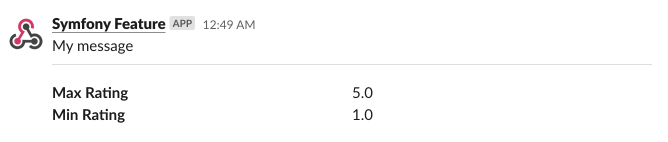
Adding Fields and Values to a Slack Message
To add fields and values to your message you can use the :method:`SlackSectionBlock::field() <Symfony\\Component\\Notifier\\Bridge\\Slack\\Block\\SlackSectionBlock::field>` method:
use Symfony\Component\Notifier\Bridge\Slack\Block\SlackDividerBlock;
use Symfony\Component\Notifier\Bridge\Slack\Block\SlackSectionBlock;
use Symfony\Component\Notifier\Bridge\Slack\SlackOptions;
use Symfony\Component\Notifier\Message\ChatMessage;

$chatMessage = new ChatMessage('Symfony Feature');

$options = (new SlackOptions())
    ->block((new SlackSectionBlock())->text('My message'))
    ->block(new SlackDividerBlock())
    ->block(
        (new SlackSectionBlock())
            ->field('*Max Rating*')
            ->field('5.0')
            ->field('*Min Rating*')
            ->field('1.0')
    );

// Add the custom options to the chat message and send the message
$chatMessage->options($options);

$chatter->send($chatMessage);
The result will be something like:
New in version 5.1: The field() method was introduced in Symfony 5.1.
Adding a Header to a Slack Message
To add a header to your message use the
Symfony\Component\Notifier\Bridge\Slack\Block\SlackHeaderBlock class:
use Symfony\Component\Notifier\Bridge\Slack\Block\SlackDividerBlock;
use Symfony\Component\Notifier\Bridge\Slack\Block\SlackHeaderBlock;
use Symfony\Component\Notifier\Bridge\Slack\Block\SlackSectionBlock;
use Symfony\Component\Notifier\Bridge\Slack\SlackOptions;
use Symfony\Component\Notifier\Message\ChatMessage;

$chatMessage = new ChatMessage('Symfony Feature');

$options = (new SlackOptions())
    ->block((new SlackHeaderBlock('My Header')))
    ->block((new SlackSectionBlock())->text('My message'))
    ->block(new SlackDividerBlock())
    ->block(
        (new SlackSectionBlock())
            ->field('*Max Rating*')
            ->field('5.0')
            ->field('*Min Rating*')
            ->field('1.0')
    );

// Add the custom options to the chat message and send the message
$chatMessage->options($options);

$chatter->send($chatMessage);
The result will be something like:

New in version 5.3: The SlackHeaderBlock class was introduced in Symfony 5.3.
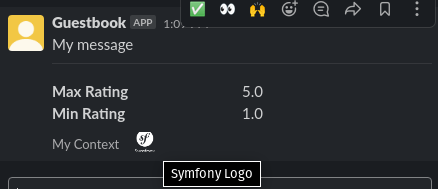
Adding a Footer to a Slack Message
To add a footer to your message use the
Symfony\Component\Notifier\Bridge\Slack\Block\SlackContextBlock class:
use Symfony\Component\Notifier\Bridge\Slack\Block\SlackContextBlock;
use Symfony\Component\Notifier\Bridge\Slack\Block\SlackDividerBlock;
use Symfony\Component\Notifier\Bridge\Slack\Block\SlackSectionBlock;
use Symfony\Component\Notifier\Bridge\Slack\SlackOptions;
use Symfony\Component\Notifier\Message\ChatMessage;

$chatMessage = new ChatMessage('Symfony Feature');

$contextBlock = (new SlackContextBlock())
    ->text('My Context')
    ->image('https://symfony.com/logos/symfony_white_03.png', 'Symfony Logo')
;

$options = (new SlackOptions())
    ->block((new SlackSectionBlock())->text('My message'))
    ->block(new SlackDividerBlock())
    ->block(
        (new SlackSectionBlock())
            ->field('*Max Rating*')
            ->field('5.0')
            ->field('*Min Rating*')
            ->field('1.0')
    )
    ->block($contextBlock)
;

$chatter->send($chatMessage);
The result will be something like:
New in version 5.3: The SlackContextBlock class was introduced in Symfony 5.3.
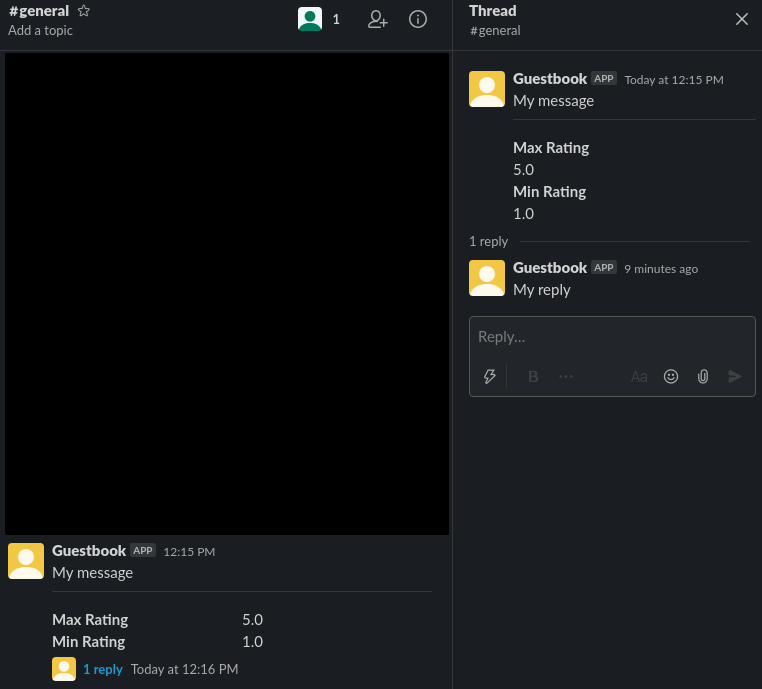
Sending a Slack Message as a Reply
To send your slack message as a reply in a thread use the :method:`SlackOptions::threadTs() <Symfony\\Component\\Notifier\\Bridge\\Slack\\SlackOptions::threadTs>` method:
use Symfony\Component\Notifier\Bridge\Slack\Block\SlackSectionBlock;
use Symfony\Component\Notifier\Bridge\Slack\SlackOptions;
use Symfony\Component\Notifier\Message\ChatMessage;

$chatMessage = new ChatMessage('Symfony Feature');

$options = (new SlackOptions())
    ->block((new SlackSectionBlock())->text('My reply'))
    ->threadTs('1621592155.003100')
;

// Add the custom options to the chat message and send the message
$chatMessage->options($options);

$chatter->send($chatMessage);
The result will be something like:
New in version 5.3: The threadTs() method was introduced in Symfony 5.3.
Adding Interactions to a Discord Message
With a Discord message, you can use the
Symfony\Component\Notifier\Bridge\Discord\DiscordOptions class
to add some interactive options called Embed elements:
use Symfony\Component\Notifier\Bridge\Discord\DiscordOptions;
use Symfony\Component\Notifier\Bridge\Discord\Embeds\DiscordEmbed;
use Symfony\Component\Notifier\Bridge\Discord\Embeds\DiscordFieldEmbedObject;
use Symfony\Component\Notifier\Bridge\Discord\Embeds\DiscordFooterEmbedObject;
use Symfony\Component\Notifier\Bridge\Discord\Embeds\DiscordMediaEmbedObject;
use Symfony\Component\Notifier\Message\ChatMessage;

$chatMessage = new ChatMessage('');

// Create Discord Embed
$discordOptions = (new DiscordOptions())
    ->username('connor bot')
    ->addEmbed((new DiscordEmbed())
        ->color(2021216)
        ->title('New song added!')
        ->thumbnail((new DiscordMediaEmbedObject())
        ->url('https://i.scdn.co/image/ab67616d0000b2735eb27502aa5cb1b4c9db426b'))
        ->addField((new DiscordFieldEmbedObject())
            ->name('Track')
            ->value('[Common Ground](https://open.spotify.com/track/36TYfGWUhIRlVjM8TxGUK6)')
            ->inline(true)
        )
        ->addField((new DiscordFieldEmbedObject())
            ->name('Artist')
            ->value('Alasdair Fraser')
            ->inline(true)
        )
        ->addField((new DiscordFieldEmbedObject())
            ->name('Album')
            ->value('Dawn Dance')
            ->inline(true)
        )
        ->footer((new DiscordFooterEmbedObject())
            ->text('Added ...')
            ->iconUrl('https://upload.wikimedia.org/wikipedia/commons/thumb/1/19/Spotify_logo_without_text.svg/200px-Spotify_logo_without_text.svg.png')
        )
    )
;

// Add the custom options to the chat message and send the message
$chatMessage->options($discordOptions);

$chatter->send($chatMessage);
Adding Interactions to a Telegram Message
With a Telegram message, you can use the
Symfony\Component\Notifier\Bridge\Telegram\TelegramOptions class
to add message options:
use Symfony\Component\Notifier\Bridge\Telegram\Reply\Markup\Button\InlineKeyboardButton;
use Symfony\Component\Notifier\Bridge\Telegram\Reply\Markup\InlineKeyboardMarkup;
use Symfony\Component\Notifier\Bridge\Telegram\TelegramOptions;
use Symfony\Component\Notifier\Message\ChatMessage;

$chatMessage = new ChatMessage('');

// Create Telegram options
$telegramOptions = (new TelegramOptions())
    ->chatId('@symfonynotifierdev')
    ->parseMode('MarkdownV2')
    ->disableWebPagePreview(true)
    ->disableNotification(true)
    ->replyMarkup((new InlineKeyboardMarkup())
        ->inlineKeyboard([
            (new InlineKeyboardButton('Visit symfony.com'))
                ->url('https://symfony.com/'),
        ])
    );

// Add the custom options to the chat message and send the message
$chatMessage->options($telegramOptions);

$chatter->send($chatMessage);
Adding text to a Microsoft Teams Message
With a Microsoft Teams, you can use the ChatMessage class:
use Symfony\Component\Notifier\Bridge\MicrosoftTeams\MicrosoftTeamsTransport;
use Symfony\Component\Notifier\Message\ChatMessage;

$chatMessage = (new ChatMessage('Contribute To Symfony'))->transport('microsoftteams');
$chatter->send($chatMessage);
The result will be something like:

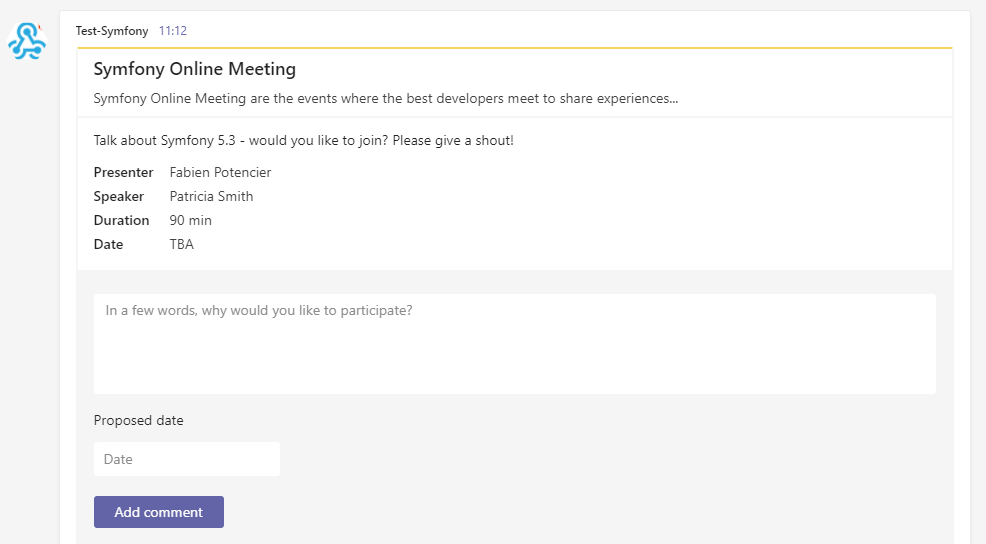
Adding Interactions to a Microsoft Teams Message
With a Microsoft Teams Message, you can use the
Symfony\Component\Notifier\Bridge\MicrosoftTeams\MicrosoftTeamsOptions class
to add MessageCard options:
use Symfony\Component\Notifier\Bridge\MicrosoftTeams\Action\ActionCard;
use Symfony\Component\Notifier\Bridge\MicrosoftTeams\Action\HttpPostAction;
use Symfony\Component\Notifier\Bridge\MicrosoftTeams\Action\Input\DateInput;
use Symfony\Component\Notifier\Bridge\MicrosoftTeams\Action\Input\TextInput;
use Symfony\Component\Notifier\Bridge\MicrosoftTeams\MicrosoftTeamsOptions;
use Symfony\Component\Notifier\Bridge\MicrosoftTeams\MicrosoftTeamsTransport;
use Symfony\Component\Notifier\Bridge\MicrosoftTeams\Section\Field\Fact;
use Symfony\Component\Notifier\Bridge\MicrosoftTeams\Section\Section;
use Symfony\Component\Notifier\Message\ChatMessage;

$chatMessage = new ChatMessage('');

// Action elements
$input = new TextInput();
$input->id('input_title');
$input->isMultiline(true)->maxLength(5)->title('In a few words, why would you like to participate?');

$inputDate = new DateInput();
$inputDate->title('Proposed date')->id('input_date');

// Create Microsoft Teams MessageCard
$microsoftTeamsOptions = (new MicrosoftTeamsOptions())
    ->title('Symfony Online Meeting')
    ->text('Symfony Online Meeting are the events where the best developers meet to share experiences...')
    ->summary('Summary')
    ->themeColor('#F4D35E')
    ->section((new Section())
        ->title('Talk about Symfony 5.3 - would you like to join? Please give a shout!')
        ->fact((new Fact())
            ->name('Presenter')
            ->value('Fabien Potencier')
        )
        ->fact((new Fact())
            ->name('Speaker')
            ->value('Patricia Smith')
        )
        ->fact((new Fact())
            ->name('Duration')
            ->value('90 min')
        )
        ->fact((new Fact())
            ->name('Date')
            ->value('TBA')
        )
    )
    ->action((new ActionCard())
        ->name('ActionCard')
        ->input($input)
        ->input($inputDate)
        ->action((new HttpPostAction())
            ->name('Add comment')
            ->target('http://target')
        )
    )
;

// Add the custom options to the chat message and send the message
$chatMessage->options($microsoftTeamsOptions);
$chatter->send($chatMessage);
The result will be something like:
New in version 5.4: Options for Microsoft Teams were introduced in Symfony 5.4.