How to send Chat Messages
The Symfony\Component\Notifier\ChatterInterface class allows
you to send messages to chat services like Slack or Telegram:
// src/Controller/CheckoutController.php
namespace App\Controller;

use Symfony\Bundle\FrameworkBundle\Controller\AbstractController;
use Symfony\Component\Notifier\ChatterInterface;
use Symfony\Component\Notifier\Message\ChatMessage;
use Symfony\Component\Routing\Annotation\Route;

class CheckoutController extends AbstractController
{
    /**
     * @Route("/checkout/thankyou")
     */
    public function thankyou(ChatterInterface $chatter)
    {
        $message = (new ChatMessage('You got a new invoice for 15 EUR.'))
            // if not set explicitly, the message is sent to the
            // default transport (the first one configured)
            ->transport('slack');

        $sentMessage = $chatter->send($message);

        // ...
    }
}
The send() method returns a variable of type
Symfony\Component\Notifier\Message\SentMessage which provides
information such as the message ID and the original message contents.
See also
Read the main Notifier guide to see how to configure the different transports.
Adding Interactions to a Slack Message
With a Slack message, you can use the
Symfony\Component\Notifier\Bridge\Slack\SlackOptions class
to add some interactive options called Block elements:
use Symfony\Component\Notifier\Bridge\Slack\Block\SlackActionsBlock;
use Symfony\Component\Notifier\Bridge\Slack\Block\SlackDividerBlock;
use Symfony\Component\Notifier\Bridge\Slack\Block\SlackImageBlockElement;
use Symfony\Component\Notifier\Bridge\Slack\Block\SlackSectionBlock;
use Symfony\Component\Notifier\Bridge\Slack\SlackOptions;
use Symfony\Component\Notifier\Message\ChatMessage;

$chatMessage = new ChatMessage('Contribute To Symfony');

// Create Slack Actions Block and add some buttons
$contributeToSymfonyBlocks = (new SlackActionsBlock())
    ->button(
        'Improve Documentation',
        'https://symfony.com/doc/current/contributing/documentation/standards.html',
        'primary'
    )
    ->button(
        'Report bugs',
        'https://symfony.com/doc/current/contributing/code/bugs.html',
        'danger'
    );

$slackOptions = (new SlackOptions())
    ->block((new SlackSectionBlock())
        ->text('The Symfony Community')
        ->accessory(
            new SlackImageBlockElement(
                'https://symfony.com/favicons/apple-touch-icon.png',
                'Symfony'
            )
        )
    )
    ->block(new SlackDividerBlock())
    ->block($contributeToSymfonyBlocks);

// Add the custom options to the chat message and send the message
$chatMessage->options($slackOptions);

$chatter->send($chatMessage);
Adding Fields and Values to a Slack Message
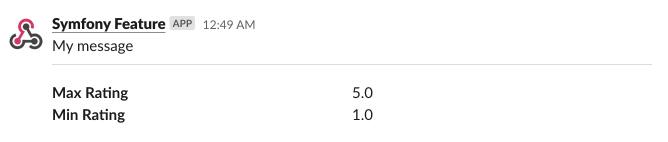
To add fields and values to your message you can use the :method:`SlackSectionBlock::field() <Symfony\\Component\\Notifier\\Bridge\\Slack\\Block\\SlackSectionBlock::field>` method:
use Symfony\Component\Notifier\Bridge\Slack\Block\SlackDividerBlock;
use Symfony\Component\Notifier\Bridge\Slack\Block\SlackSectionBlock;
use Symfony\Component\Notifier\Bridge\Slack\SlackOptions;
use Symfony\Component\Notifier\Message\ChatMessage;

$chatMessage = new ChatMessage('Symfony Feature');

$options = (new SlackOptions())
    ->block((new SlackSectionBlock())->text('My message'))
    ->block(new SlackDividerBlock())
    ->block(
        (new SlackSectionBlock())
            ->field('*Max Rating*')
            ->field('5.0')
            ->field('*Min Rating*')
            ->field('1.0')
    );

// Add the custom options to the chat message and send the message
$chatMessage->options($options);

$chatter->send($chatMessage);
The result will be something like:
Adding a Header to a Slack Message
To add a header to your message use the
Symfony\Component\Notifier\Bridge\Slack\Block\SlackHeaderBlock class:
use Symfony\Component\Notifier\Bridge\Slack\Block\SlackDividerBlock;
use Symfony\Component\Notifier\Bridge\Slack\Block\SlackHeaderBlock;
use Symfony\Component\Notifier\Bridge\Slack\Block\SlackSectionBlock;
use Symfony\Component\Notifier\Bridge\Slack\SlackOptions;
use Symfony\Component\Notifier\Message\ChatMessage;

$chatMessage = new ChatMessage('Symfony Feature');

$options = (new SlackOptions())
    ->block((new SlackHeaderBlock('My Header')))
    ->block((new SlackSectionBlock())->text('My message'))
    ->block(new SlackDividerBlock())
    ->block(
        (new SlackSectionBlock())
            ->field('*Max Rating*')
            ->field('5.0')
            ->field('*Min Rating*')
            ->field('1.0')
    );

// Add the custom options to the chat message and send the message
$chatMessage->options($options);

$chatter->send($chatMessage);
The result will be something like:

Adding a Footer to a Slack Message
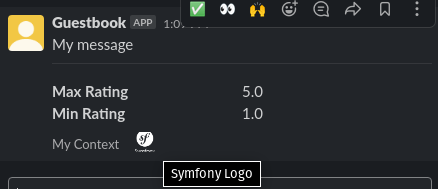
To add a footer to your message use the
Symfony\Component\Notifier\Bridge\Slack\Block\SlackContextBlock class:
use Symfony\Component\Notifier\Bridge\Slack\Block\SlackContextBlock;
use Symfony\Component\Notifier\Bridge\Slack\Block\SlackDividerBlock;
use Symfony\Component\Notifier\Bridge\Slack\Block\SlackSectionBlock;
use Symfony\Component\Notifier\Bridge\Slack\SlackOptions;
use Symfony\Component\Notifier\Message\ChatMessage;

$chatMessage = new ChatMessage('Symfony Feature');

$contextBlock = (new SlackContextBlock())
    ->text('My Context')
    ->image('https://symfony.com/logos/symfony_white_03.png', 'Symfony Logo')
;

$options = (new SlackOptions())
    ->block((new SlackSectionBlock())->text('My message'))
    ->block(new SlackDividerBlock())
    ->block(
        (new SlackSectionBlock())
            ->field('*Max Rating*')
            ->field('5.0')
            ->field('*Min Rating*')
            ->field('1.0')
    )
    ->block($contextBlock)
;

$chatter->send($chatMessage);
The result will be something like:
Sending a Slack Message as a Reply
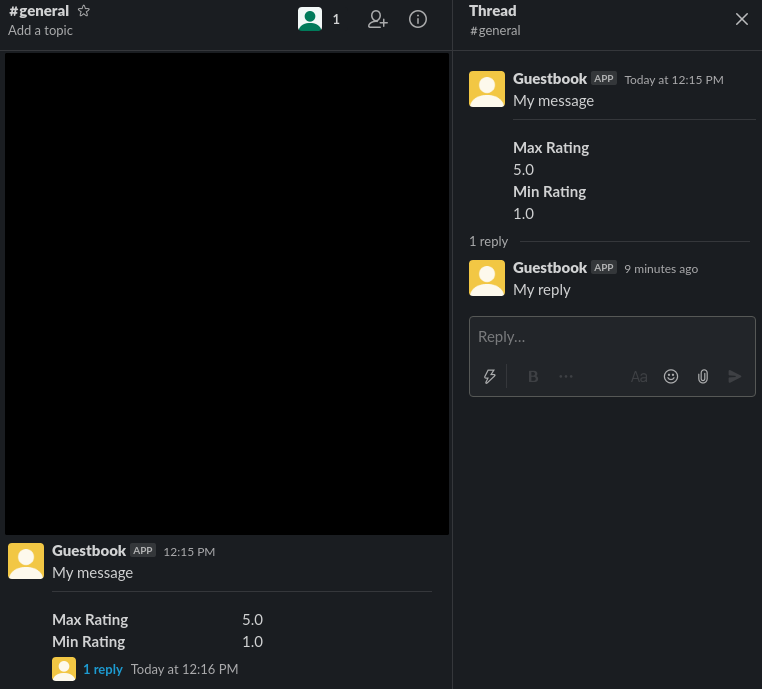
To send your slack message as a reply in a thread use the :method:`SlackOptions::threadTs() <Symfony\\Component\\Notifier\\Bridge\\Slack\\SlackOptions::threadTs>` method:
use Symfony\Component\Notifier\Bridge\Slack\Block\SlackSectionBlock;
use Symfony\Component\Notifier\Bridge\Slack\SlackOptions;
use Symfony\Component\Notifier\Message\ChatMessage;

$chatMessage = new ChatMessage('Symfony Feature');

$options = (new SlackOptions())
    ->block((new SlackSectionBlock())->text('My reply'))
    ->threadTs('1621592155.003100')
;

// Add the custom options to the chat message and send the message
$chatMessage->options($options);

$chatter->send($chatMessage);
The result will be something like:
Adding Interactions to a Discord Message
With a Discord message, you can use the
Symfony\Component\Notifier\Bridge\Discord\DiscordOptions class
to add some interactive options called Embed elements:
use Symfony\Component\Notifier\Bridge\Discord\DiscordOptions;
use Symfony\Component\Notifier\Bridge\Discord\Embeds\DiscordEmbed;
use Symfony\Component\Notifier\Bridge\Discord\Embeds\DiscordFieldEmbedObject;
use Symfony\Component\Notifier\Bridge\Discord\Embeds\DiscordFooterEmbedObject;
use Symfony\Component\Notifier\Bridge\Discord\Embeds\DiscordMediaEmbedObject;
use Symfony\Component\Notifier\Message\ChatMessage;

$chatMessage = new ChatMessage('');

// Create Discord Embed
$discordOptions = (new DiscordOptions())
    ->username('connor bot')
    ->addEmbed((new DiscordEmbed())
        ->color(2021216)
        ->title('New song added!')
        ->thumbnail((new DiscordMediaEmbedObject())
        ->url('https://i.scdn.co/image/ab67616d0000b2735eb27502aa5cb1b4c9db426b'))
        ->addField((new DiscordFieldEmbedObject())
            ->name('Track')
            ->value('[Common Ground](https://open.spotify.com/track/36TYfGWUhIRlVjM8TxGUK6)')
            ->inline(true)
        )
        ->addField((new DiscordFieldEmbedObject())
            ->name('Artist')
            ->value('Alasdair Fraser')
            ->inline(true)
        )
        ->addField((new DiscordFieldEmbedObject())
            ->name('Album')
            ->value('Dawn Dance')
            ->inline(true)
        )
        ->footer((new DiscordFooterEmbedObject())
            ->text('Added ...')
            ->iconUrl('https://upload.wikimedia.org/wikipedia/commons/thumb/1/19/Spotify_logo_without_text.svg/200px-Spotify_logo_without_text.svg.png')
        )
    )
;

// Add the custom options to the chat message and send the message
$chatMessage->options($discordOptions);

$chatter->send($chatMessage);
Adding Interactions to a Telegram Message
With a Telegram message, you can use the
Symfony\Component\Notifier\Bridge\Telegram\TelegramOptions class
to add message options:
use Symfony\Component\Notifier\Bridge\Telegram\Reply\Markup\Button\InlineKeyboardButton;
use Symfony\Component\Notifier\Bridge\Telegram\Reply\Markup\InlineKeyboardMarkup;
use Symfony\Component\Notifier\Bridge\Telegram\TelegramOptions;
use Symfony\Component\Notifier\Message\ChatMessage;

$chatMessage = new ChatMessage('');

// Create Telegram options
$telegramOptions = (new TelegramOptions())
    ->chatId('@symfonynotifierdev')
    ->parseMode('MarkdownV2')
    ->disableWebPagePreview(true)
    ->disableNotification(true)
    ->replyMarkup((new InlineKeyboardMarkup())
        ->inlineKeyboard([
            (new InlineKeyboardButton('Visit symfony.com'))
                ->url('https://symfony.com/'),
        ])
    );

// Add the custom options to the chat message and send the message
$chatMessage->options($telegramOptions);

$chatter->send($chatMessage);
Adding text to a Microsoft Teams Message
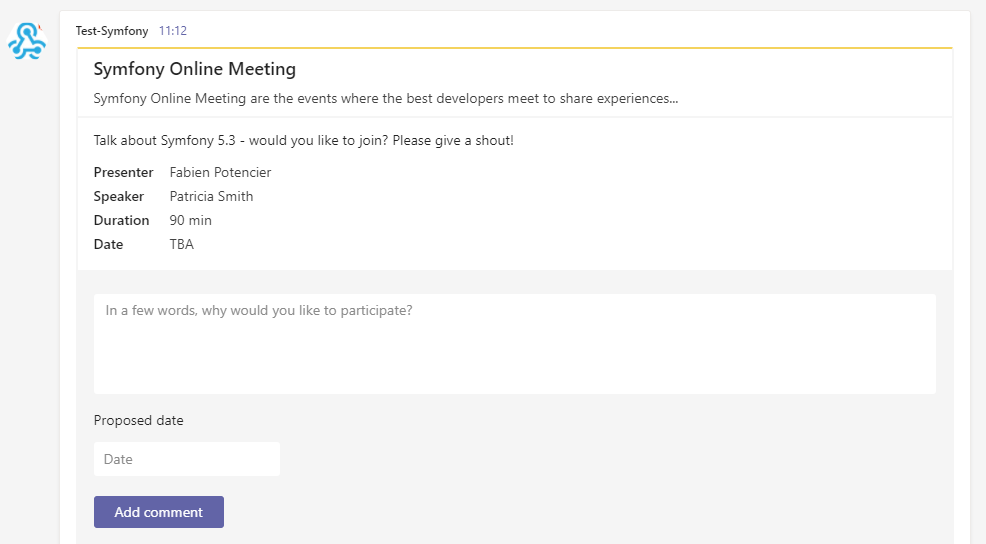
With a Microsoft Teams, you can use the ChatMessage class:
use Symfony\Component\Notifier\Bridge\MicrosoftTeams\MicrosoftTeamsTransport;
use Symfony\Component\Notifier\Message\ChatMessage;

$chatMessage = (new ChatMessage('Contribute To Symfony'))->transport('microsoftteams');
$chatter->send($chatMessage);
The result will be something like:

Adding Interactions to a Microsoft Teams Message
With a Microsoft Teams Message, you can use the
Symfony\Component\Notifier\Bridge\MicrosoftTeams\MicrosoftTeamsOptions class
to add MessageCard options:
use Symfony\Component\Notifier\Bridge\MicrosoftTeams\Action\ActionCard;
use Symfony\Component\Notifier\Bridge\MicrosoftTeams\Action\HttpPostAction;
use Symfony\Component\Notifier\Bridge\MicrosoftTeams\Action\Input\DateInput;
use Symfony\Component\Notifier\Bridge\MicrosoftTeams\Action\Input\TextInput;
use Symfony\Component\Notifier\Bridge\MicrosoftTeams\MicrosoftTeamsOptions;
use Symfony\Component\Notifier\Bridge\MicrosoftTeams\MicrosoftTeamsTransport;
use Symfony\Component\Notifier\Bridge\MicrosoftTeams\Section\Field\Fact;
use Symfony\Component\Notifier\Bridge\MicrosoftTeams\Section\Section;
use Symfony\Component\Notifier\Message\ChatMessage;

$chatMessage = new ChatMessage('');

// Action elements
$input = new TextInput();
$input->id('input_title');
$input->isMultiline(true)->maxLength(5)->title('In a few words, why would you like to participate?');

$inputDate = new DateInput();
$inputDate->title('Proposed date')->id('input_date');

// Create Microsoft Teams MessageCard
$microsoftTeamsOptions = (new MicrosoftTeamsOptions())
    ->title('Symfony Online Meeting')
    ->text('Symfony Online Meeting are the events where the best developers meet to share experiences...')
    ->summary('Summary')
    ->themeColor('#F4D35E')
    ->section((new Section())
        ->title('Talk about Symfony 5.3 - would you like to join? Please give a shout!')
        ->fact((new Fact())
            ->name('Presenter')
            ->value('Fabien Potencier')
        )
        ->fact((new Fact())
            ->name('Speaker')
            ->value('Patricia Smith')
        )
        ->fact((new Fact())
            ->name('Duration')
            ->value('90 min')
        )
        ->fact((new Fact())
            ->name('Date')
            ->value('TBA')
        )
    )
    ->action((new ActionCard())
        ->name('ActionCard')
        ->input($input)
        ->input($inputDate)
        ->action((new HttpPostAction())
            ->name('Add comment')
            ->target('http://target')
        )
    )
;

// Add the custom options to the chat message and send the message
$chatMessage->options($microsoftTeamsOptions);
$chatter->send($chatMessage);
The result will be something like: